

Best overall: barcode plastic gift cards when your POS supports barcode redemption. Best for manual tracking: uniquely numbered cards. Best for online redemption: QR-code cards. This 2026 plastic gift card printing guide compares five formats so you can choose cards that work at checkout, not just look right.
- Choose barcode plastic gift card printing when your POS supports scanning, activation and balance tracking.
- Uniquely numbered gift cards suit manual workflows but require a controlled redemption record.
- QR-code gift cards connect customers to online redemption; the linked system must manage balances securely.
- Print Fast suits Toronto businesses seeking local print support and custom quotes.
- Approve a working sample before committing to a full print run.
Why this matters
A printed gift card is a physical identifier, not a balance-management system. Your checkout software or redemption record must connect that identifier to the remaining value. Printing a barcode, magnetic stripe or chip does not create that connection automatically.
For your 2026 retail programme, choose the redemption method before the artwork. If you are also preparing custom stickers for small-business packaging, keep the gift-card design consistent with the packaging, but treat checkout functionality as a separate approval.
Print Fast is best for Toronto businesses seeking local print support and custom quotes. For a plastic gift card printing enquiry, ask for confirmation of the required material, identifier format and production schedule before approving the job.
What makes the best plastic gift card printing
Use these criteria to judge the card format and the print proposal:
- Checkout compatibility: Your POS or redemption platform must recognise the card identifier and support the intended transaction.
- Unique identifiers: Each redeemable card needs a distinct record. Repeated decorative codes do not provide individual balance tracking.
- Readable printing: Barcodes, QR codes and human-readable numbers need clear reproduction and suitable placement.
- Material and dimensions: Specify the finished size, thickness and surface rather than relying on the phrase plastic card.
- Proofing and testing: Review artwork and test a representative card through activation, redemption and balance lookup.
- Production scope: Confirm whether the order includes printing only, variable data, stripe encoding or chip programming.
A familiar reference is the ISO/IEC 7810 ID-1 format: 85.60 mm wide, 53.98 mm high and nominally 0.76 mm thick. These are standard card dimensions, not a specification for every gift-card order. Ask your printer and hardware provider which dimensions your programme requires.
Plastic gift card formats at a glance
The ranking below prioritises checkout fit, then the work needed to operate the programme. It compares formats rather than claiming one printer supports every technology.
| Rank and format | Best for | Standout feature | Key limitation |
|---|---|---|---|
| 1. Barcode plastic gift cards | Retailers with barcode-enabled gift-card systems | Scanned identifier linked to a gift-card record | Requires compatible scanning and balance software |
| 2. Uniquely numbered plastic gift cards | Owner-operated shops using manual redemption | Human-readable identifier for record lookup | Staff must maintain accurate records |
| 3. QR-code plastic gift cards | Retailers with online redemption workflows | Scannable connection to a supported digital destination | A website link alone does not track value |
| 4. Magnetic-stripe plastic gift cards | Retailers with existing swipe-based gift-card systems | Encoded identifier for compatible readers | Encoding must match the system requirements |
| 5. NFC plastic gift cards | Retailers with a confirmed contactless gift-card workflow | Tap-based access to a supported identifier or destination | Generic NFC chips are not automatically POS-compatible |
1. Barcode cards: best for scanner-based retail checkout
Barcode plastic gift cards carry an identifier that a compatible scanner reads. Your gift-card system uses that identifier to find the card record, activate it and process redemption. The barcode itself does not hold the changing balance.
Best for: Retailers whose existing gift-card platform supports barcode-based cards.
Barcode plastic gift card pros:
- Scanning avoids typing the identifier during supported transactions.
- A printed number can provide a fallback for manual lookup.
- The artwork can retain a clear front while reserving the reverse for redemption details.
Barcode plastic gift card cons:
- The barcode format and number structure must match the platform.
- Poor contrast, unsuitable placement or an incompatible scanner can prevent reading.
- A visible barcode is not a secret credential; the platform still needs appropriate controls.
For a 2026 launch, obtain the required barcode type and identifier rules from your POS provider before preparing variable artwork. Do not let the designer choose a barcode simply because it fits the layout. Test the printed result with the actual checkout scanner.
Verdict: Buy barcode plastic gift cards when your existing gift-card system supports them. This is the default choice for a scanner-based retail workflow, not a substitute for checking compatibility.
2. Numbered cards: best for owner-managed redemption
Uniquely numbered plastic gift cards display a readable identifier that staff use to find a redemption record. The record holds the issued value, transaction history and remaining balance. This approach separates a straightforward printed card from the work of managing it.
Best for: Owner-operated shops that deliberately use a manual gift-card process.
Uniquely numbered plastic gift card pros:
- Staff can read the identifier without scanning equipment.
- The card design does not need a machine-readable code.
- A numbered sequence makes individual cards distinguishable in the record.
Uniquely numbered plastic gift card cons:
- Manual entry creates opportunities for typing and reconciliation errors.
- Staff need a shared, controlled record rather than separate informal notes.
- A visible number alone does not prove that the person presenting it owns the balance.
Write the redemption procedure before ordering. Specify who can activate a card, who can change a balance and how staff record partial redemption. Include a process for duplicate presentations and disputed balances.
Do not describe numbered cards as the cheapest option without comparable quotes. Printing requirements and administrative work are separate considerations.
Verdict: Buy uniquely numbered plastic gift cards for a controlled manual programme; skip them if you need automated checkout tracking.
3. QR-code cards: best for online redemption access
QR-code plastic gift cards let a phone or compatible scanner read encoded information. The code can point to a redemption page or carry an identifier recognised by your platform. A QR code that opens your homepage is promotional printing, not a functioning gift-card programme.
Best for: Retailers with an established online gift-card redemption process.
QR-code plastic gift card pros:
- Customers can access a supported online destination from a printed card.
- The reverse can combine redemption instructions with a readable identifier.
- The format connects physical gifting with a digital workflow.
QR-code plastic gift card cons:
- A static destination does not manage individual balances by itself.
- Redemption credentials visible in the code need appropriate protection.
- A damaged or poorly printed code can interrupt the customer journey.
Keep clear space around the code and avoid stretching it to fit a narrow panel. Test the finished print, not only the design file, using the devices your customers or staff will use.
For your 2026 programme, decide whether scanning starts redemption, shows a balance or opens instructions. Those are different actions. The destination and on-card wording should agree.
Verdict: Buy QR-code plastic gift cards when a working online redemption system already exists. Skip a generic website QR code if the objective is individual stored-value tracking.
4. Magnetic-stripe cards: best for existing swipe systems
Magnetic-stripe plastic gift cards carry encoded data that compatible readers interpret. They fit programmes designed around swipe-based identifiers. Printing the card face and encoding the stripe are separate production requirements.
Best for: Retailers whose gift-card provider explicitly requires magnetic-stripe cards.
Magnetic-stripe plastic gift card pros:
- The format supports an established swipe-based redemption workflow.
- Printed numbers can support lookup when the system permits it.
- The card face remains available for branding and gifting artwork.
Magnetic-stripe plastic gift card cons:
- Stripe type, track layout and encoded data must match the provider's specification.
- A printed card with an unencoded stripe is not ready for swipe redemption.
- Worn or damaged stripes can create reading problems.
Ask your gift-card provider for the encoding specification and a sample-data requirement. Give that information to the printer before requesting production approval. Include a read test on your store's equipment.
Do not order magnetic stripes simply because they resemble familiar payment cards. Appearance does not establish compatibility with a payment terminal or gift-card platform.
Verdict: Buy magnetic-stripe plastic gift cards to match a confirmed swipe-based system; skip them for a new programme without that requirement.
5. NFC cards: best for confirmed contactless workflows
NFC plastic gift cards contain a chip that compatible devices can read at close range. Depending on the implementation, the chip provides an identifier or opens a digital destination. Neither function automatically makes it a payment credential.
Best for: Retailers whose programme provider has approved a specific NFC implementation.
NFC plastic gift card pros:
- A supported workflow lets customers or staff tap rather than scan.
- The chip can provide access to a configured digital destination.
- The printed design does not need a prominent optical code for the tap function.
NFC plastic gift card cons:
- Chip type and data configuration must match the intended reader or platform.
- A phone-readable NFC link does not establish checkout-terminal compatibility.
- Printing, chip configuration and redemption integration require separate checks.
Before adding NFC to a 2026 order, ask exactly what happens after a tap. Identify the reader, the data it expects and the software that processes redemption. A demonstration that opens a webpage does not prove a gift-card transaction works.
Verdict: Hold NFC plastic gift cards until your provider confirms the complete contactless redemption workflow. Choose the technology for a defined checkout action, not for novelty.
How the formats are ranked
Barcode cards take the default position because they fit a clearly defined scanner-based programme. Numbered cards serve manual operations, QR codes serve online access, magnetic stripes serve existing swipe systems and NFC serves confirmed contactless implementations.
The ranking follows the criteria above: checkout compatibility, identifier control, readability, physical specification, testing and production scope. Your existing gift-card platform overrides the ranking. If that platform requires an encoded stripe, magnetic-stripe cards become your first choice.
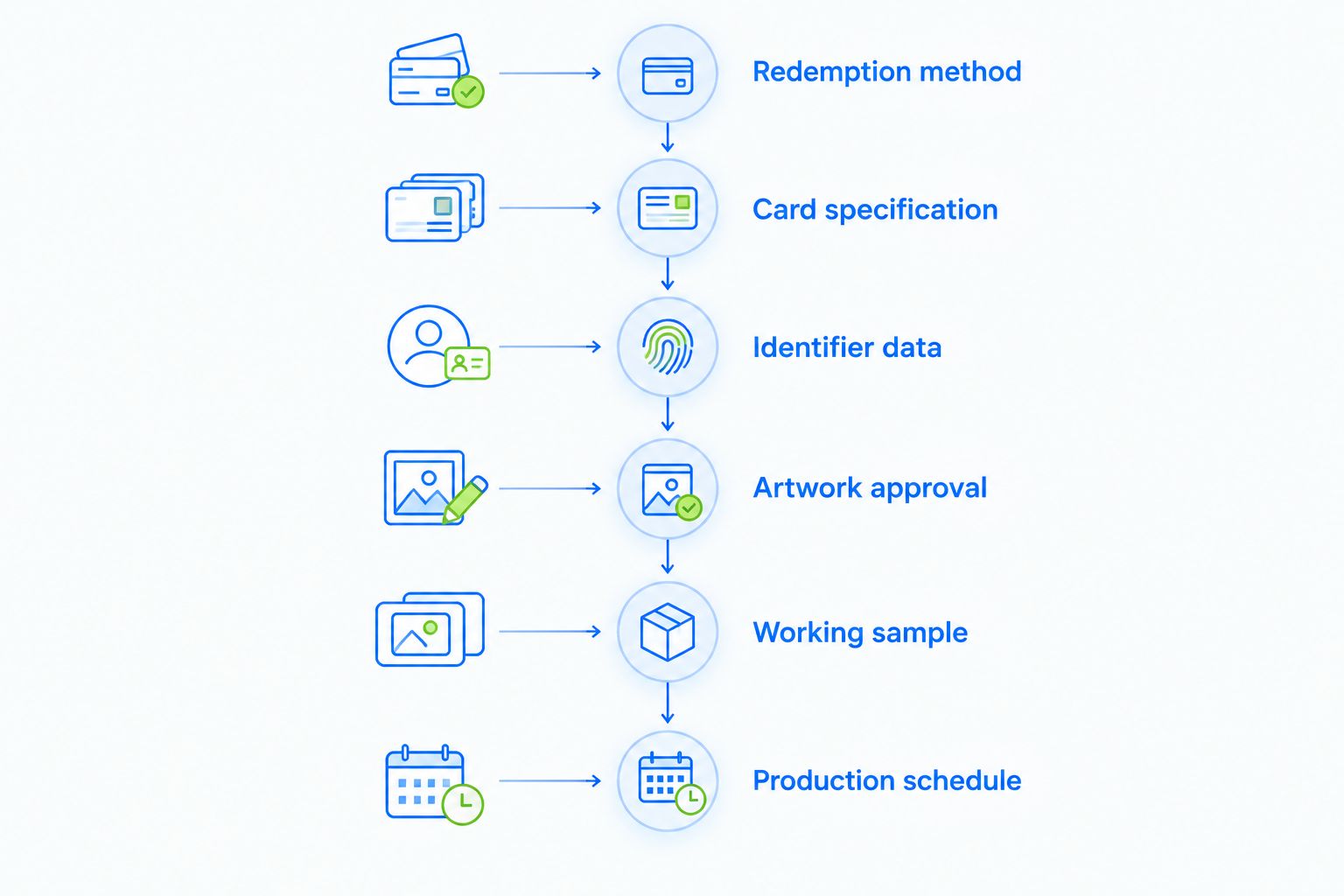
Prepare a print-ready gift-card brief
For plastic gift card printing in 2026, send the printer a functional brief alongside the artwork. Print Fast offers Custom Quotes and Live Support; use that discussion to establish the requested production scope rather than assuming every card technology is included.
- Redemption method: Name the platform and describe how staff redeem the card.
- Card specification: State the required material, finished dimensions and surface.
- Identifier data: Provide the approved identifier structure and handling instructions.
- Artwork approval: Check front and reverse layouts, instructions and code placement.
- Working sample: Test reading, activation, redemption and balance lookup.
- Production schedule: Confirm the agreed completion and handover requirements.
Keep customer information out of artwork files unless the programme genuinely requires it. Card identifiers need controlled handling, too. Agree who supplies the data, who checks for duplicates and who approves the final output.
Which plastic gift cards should you choose?
Choose barcode plastic gift cards if your current POS supports them. Choose uniquely numbered cards for a deliberate manual process, QR-code cards for supported online redemption, magnetic stripes for an existing swipe requirement and NFC only after contactless compatibility is confirmed.
The undecided retailer should start with the POS provider's card specification. Take that specification to the printer. This sequence prevents you from approving attractive artwork for a card your checkout cannot redeem.
FAQ
What’s the best plastic gift card printing format for a retail shop?
Barcode plastic gift cards are the default recommendation when your retail POS supports barcode-based gift cards. Your platform’s required identifier format takes priority over the general ranking.
Does printing a gift card create its balance?
No. The gift-card platform or controlled redemption record holds the balance, while the printed card identifies the relevant record.
Are QR-code gift cards better than barcode gift cards?
QR-code gift cards fit online access workflows; barcode gift cards fit supported scanner-based checkout workflows. Choose the format your redemption system recognises rather than treating either as universally better.
Can I use numbered plastic gift cards without a scanner?
Yes, uniquely numbered cards can support manual lookup and redemption. Staff need a controlled record for activation, remaining balances and transaction history.
What size should a plastic gift card be?
A common reference is the ISO/IEC 7810 ID-1 format: 85.60 mm wide, 53.98 mm high and nominally 0.76 mm thick. Confirm the dimensions required by your printer, packaging and reading equipment before ordering.
Will an NFC gift card work with my payment terminal?
An NFC chip does not automatically make a gift card compatible with your payment terminal. Your programme provider must confirm the chip, reader and redemption software work together.
What should I send when requesting a plastic gift card printing quote?
Send the quantity, artwork, card dimensions, redemption method and identifier requirements. Specify whether the job requires variable-data printing, magnetic-stripe encoding or NFC configuration, and request a working sample.
One last thing
A readable card is not necessarily a redeemable card. A scanner can read an identifier that your system does not recognise. Make the final approval a complete redemption test, including a partial redemption and a remaining-balance check, rather than a visual inspection alone.
Related guides
- Custom hang tags for clothing brands
- Business card printing services in Toronto
- Custom gift boxes for corporate gifting
Request a custom quote from Print Fast for your plastic gift card printing requirements. Include your redemption specification and launch date, and confirm the production scope before approving artwork.

