

PrintCloud is a sensible benchmark when your existing ordering process already gets the right print into your hands on time. It stops being enough when a new job requires a turnaround, format or local handoff that your current arrangement cannot meet. The best PrintCloud alternative in 2026 is Print Fast for Toronto rush printing; Staples for an in-store print counter; Vistaprint for an online design-and-order workflow.
- Compare PrintCloud alternatives by product, confirmed turnaround and delivery destination—not by the longest catalogue.
- Print Fast is the best fit for Toronto rush printing with local delivery, live support and custom quotes.
- Choose Staples when an in-store print counter matters; choose Vistaprint when online design tools suit your workflow.
- Keep PrintCloud when your existing print quality, ordering process and deadlines already meet the brief.
Why this matters
A business card order before a meeting is a different buying decision from a planned brochure run. Both need accurate artwork. Only one depends on getting finished print into your hands before a fixed appointment.
For Toronto and GTA businesses comparing printers in 2026, separate three questions: can the provider produce the item, can it complete the exact specification on time, and can you receive it where you need it? A broad product range answers only the first question.
If cards are your immediate priority, the business card printing services in Toronto guide keeps the comparison focused on that product rather than unrelated promotional merchandise.
Choose the printer around the job, not the other way round. A familiar checkout is useful, but it does not replace a confirmed production and handoff plan.
PrintCloud alternatives at a glance
This comparison separates buying workflows rather than treating every printer as interchangeable. Use PrintCloud as your existing benchmark, then test the alternatives against the same artwork, quantity, finish and deadline.
| Provider | Best for | Standout feature or decision point | How it differs from PrintCloud |
|---|---|---|---|
| PrintCloud | Staying with an ordering process that already meets your needs | Your existing experience with quality and fulfilment | The benchmark: judge alternatives against the same job specification |
| Print Fast | Toronto businesses needing rush printing and local support | 1Hr, Same Day and 24Hr printing services, plus Local Delivery and Live Support | A Toronto-based option when rush production and local coordination drive the decision |
| Staples | Buyers who want an in-store print counter | Retail print-and-copy service | An alternative workflow when you prefer to discuss the job at a store |
| Vistaprint | Buyers who want online design and ordering | Online custom-print ordering and design tools | An alternative workflow when you want to prepare and order through an online interface |
The right choice in 2026 depends on your specific order. Do not read a provider's general service description as confirmation that every material, finish and quantity follows the same production schedule.
1. Print Fast: best for Toronto rush printing
Print Fast offers business cards, flyers, banners, signs, stickers, calendars and promotional items for Canadian small businesses and organizations. Its Toronto-based service includes 1-hour, same-day and 24-hour custom printing, local delivery, live support and custom quotes. That makes it the clearest fit here when a Toronto deadline drives the purchase.
Best for: Toronto and GTA owners, marketing managers and event organizers who need a rush print order coordinated around a specific handoff.
Where Print Fast shines
- Rush options: 1Hr, Same Day and 24Hr services give you a concrete turnaround to discuss for the job.
- Local coordination: Local Delivery and Live Support address the practical questions between approving artwork and receiving print.
- Useful business products: Cards, flyers, banners, signs and stickers cover distinct customer-facing needs.
- Custom Quotes: You can frame the request around your actual product, quantity, finish and deadline.
Where Print Fast falls short
- A Toronto-based service is less relevant if your priority is face-to-face support in another city.
- A rush service label is not an order-specific production commitment. Confirm the selected product and finishing requirements before scheduling your handoff.
- Local delivery does not remove the need to supply an exact destination and required arrival time.
These are buying constraints, not reasons to reject the service. They tell you what needs agreement before you approve the job.
Print Fast versus PrintCloud
| Dimension | Print Fast | PrintCloud benchmark |
|---|---|---|
| Turnaround | Offers 1-hour, same-day and 24-hour custom printing | Compare the completion time confirmed for your exact order |
| Support | Live support and custom quotes | Compare how you resolve artwork and specification questions |
| Handoff | Toronto-based service with local delivery | Compare the destination and receipt time agreed for your job |
| Product fit | Business cards, flyers, banners, signs, stickers and other stated products | Compare the required product, material and finishing specification |
For a 2026 event, give the required receipt time rather than just the event date. A banner needed before setup has a different deadline from handouts needed when guests arrive.
Verdict: Buy for a Toronto rush job once the specification and handoff are confirmed.
2. Staples: best for an in-store print counter
Staples is a print-and-copy alternative when you prefer a retail counter to an entirely online exchange. The reason to shortlist it is the workflow: discussing a print brief in person can suit buyers who want to explain the intended use directly.
Best for: Buyers who want to speak with a print counter about a straightforward business-printing job.
Where Staples shines
- Its retail print-and-copy model gives you an in-store route for discussing the order.
- A counter conversation suits questions about the document, intended use and required output.
- It gives you another provider to compare against an existing PrintCloud order specification.
Where Staples falls short
- A nearby store does not establish that your requested format, finish or deadline fits its production process.
- Visiting a counter adds a separate step if you already have a complete, print-ready brief.
- An in-person discussion still needs a written specification to prevent misunderstandings.
Staples versus PrintCloud
| Dimension | Staples | PrintCloud benchmark |
|---|---|---|
| Ordering approach | Retail print-and-copy counter | Compare with the ordering process you currently use |
| Specification discussion | In-store conversation | Compare how clearly your current process records requirements |
| Deadline decision | Confirm the exact job with the selected location | Compare the completion and handoff time for the same brief |
Choose Staples because you want the counter workflow, not because a retail location automatically settles the production question. Bring the final artwork and a written brief so the conversation produces a usable answer.
Verdict: Hold until the selected location confirms the product and deadline.
3. Vistaprint: best for online design and ordering
Vistaprint is an alternative for buyers who want online custom-print ordering and design tools. That workflow suits a project where preparing the design through an online interface is part of the task, rather than a job that depends on local coordination.
Best for: Buyers who want to create or prepare a design online and place a custom-print order through the same workflow.
Where Vistaprint shines
- Online design tools provide a route for preparing custom print.
- Online ordering suits buyers who prefer a self-directed process.
- It offers a different buying workflow to compare with your current PrintCloud arrangement.
Where Vistaprint falls short
- Online design tools are less relevant when your artwork is already finished and approved.
- A completed online design does not establish when the printed order will reach your destination.
- A self-directed workflow still requires you to check product dimensions, artwork placement and the final specification.
Vistaprint versus PrintCloud
| Dimension | Vistaprint | PrintCloud benchmark |
|---|---|---|
| Design workflow | Online design tools | Compare with how you currently create and approve artwork |
| Ordering workflow | Online custom-print ordering | Compare the steps needed to submit the same brief |
| Receipt deadline | Check the order-specific production and delivery plan | Compare the agreed receipt time for the same destination |
For a planned 2026 campaign, decide whether you need design assistance or simply production. Those are separate needs, and an attractive design workflow does not answer a delivery question.
Verdict: Buy when online design and ordering fit the brief and the receipt deadline is confirmed.
Why switch from PrintCloud?
Switch when another provider solves a requirement your current arrangement cannot meet. That is a reason to compare suppliers, not evidence that PrintCloud performs poorly.
Use these triggers to decide whether a fresh comparison is necessary:
- Changed deadline: Your next job needs a different completion or receipt time from the arrangement you normally use.
- Changed support needs: You want a live conversation or an in-store discussion before approving production.
- Changed handoff: You need the print delivered to a particular Toronto destination rather than following your usual receipt process.
- Changed product: The new job needs a different format, material or finish from previous orders.
- Changed workflow: You need online design tools, or you already have finished artwork and want to focus on production.
Do not switch because a provider has a longer list of products you do not need. Compare the item you will actually order.
For a launch involving cards, flyers and a banner, separate the specifications. Approving the card artwork does not approve the banner layout, and a deadline confirmed for one item does not establish the schedule for another.
How to compare quotes without changing the brief
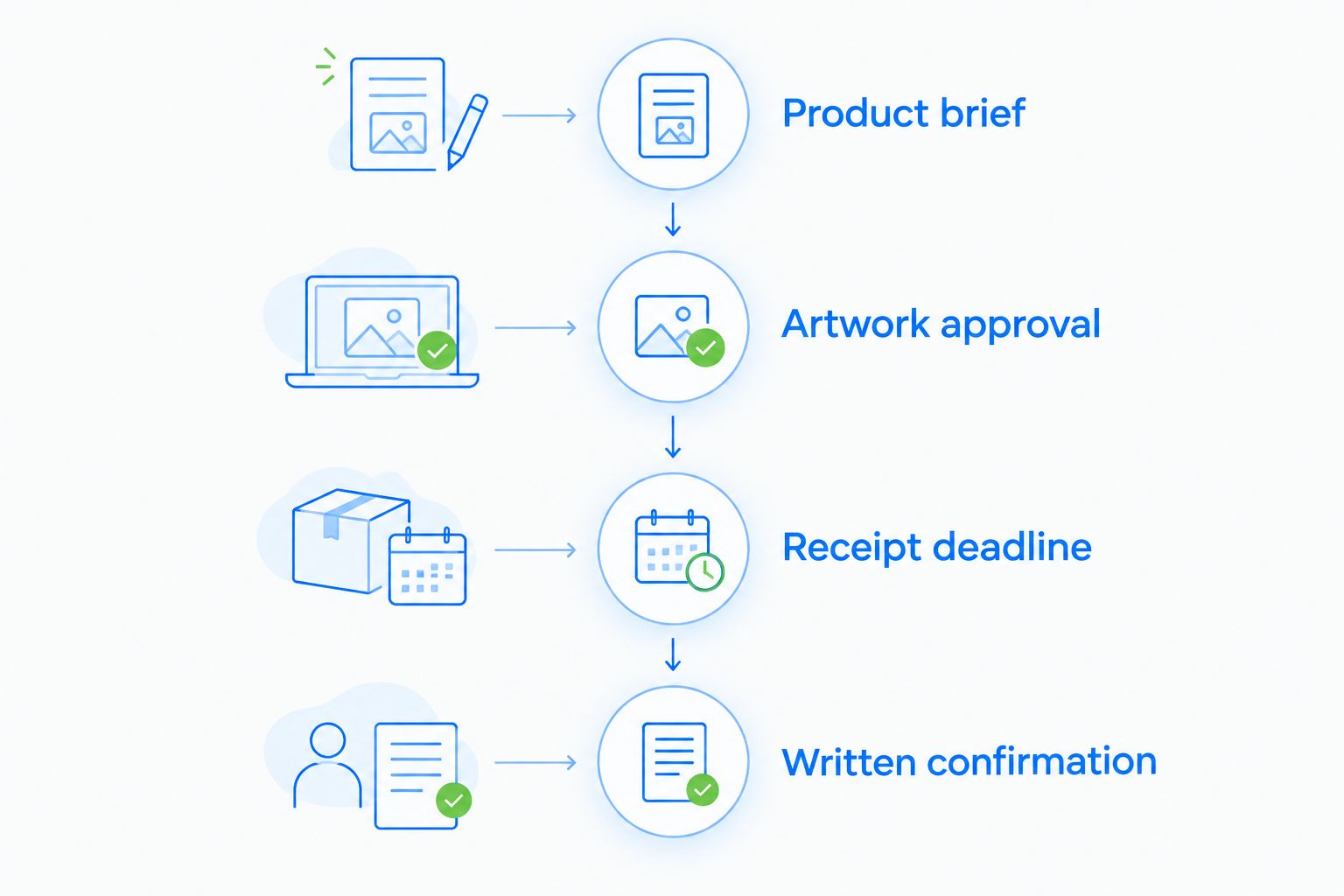
Use the same four steps for every provider you shortlist. This prevents a fast answer to an incomplete request from looking better than a detailed answer to a complete one.
Product brief
State the product, quantity, finished size, material preference and intended use. Distinguish indoor display from outdoor use, and identify any finishing that is essential to the job.
Artwork approval
Identify the final file and the person authorized to approve it. Check names, contact details, dates and artwork placement before submitting approval; a production conversation is not a substitute for proofreading.
Receipt deadline
Give the required receipt date, time and destination. Ask separately about production completion and the handoff, because finishing the print and receiving the print are different events.
Written confirmation
Keep the agreed specification, approval and handoff details together. If a requirement changes, confirm the effect on the job before treating the earlier agreement as current.
For rush printing in 2026, the most useful question is specific: can this exact file, product and quantity reach this destination by the required time? It connects the production decision to the outcome you need.
When staying with PrintCloud is the right call
Stay with PrintCloud when your existing quality, ordering process and receipt deadlines already meet the brief. There is no reason to replace a working arrangement just because an alternatives list exists.
Repeat work also gives you a practical benchmark. Keep the specification from a satisfactory order and use it to evaluate any replacement; otherwise, you risk comparing different materials or finishes while assuming the providers are producing the same thing.
Reassess when the job changes. A dependable routine order and an urgent event order do not have to use the same supplier.
FAQ
What’s the best PrintCloud alternative for Toronto rush printing?
Print Fast is the best fit here for Toronto rush printing because it offers 1-hour, same-day and 24-hour custom printing, local delivery and live support. Confirm the turnaround for your exact product, artwork and destination before approving the order.
Is Staples better than PrintCloud for business printing?
Staples is the better workflow fit when you want an in-store print counter. Compare the same product specification and receipt deadline before choosing between providers.
When should I choose Vistaprint instead of PrintCloud?
Choose Vistaprint when online design tools and online custom-print ordering match your project. Confirm the order-specific production and delivery plan against your required receipt time.
Can I get business cards printed the same day in Toronto?
Print Fast offers same-day custom printing and business card printing. Ask for confirmation that your selected card specification and final artwork fit the required handoff.
Does one-hour printing mean I receive the order within one hour?
A production turnaround and a receipt deadline are different commitments. Confirm both production completion and the delivery or handoff arrangement for your order.
What should I send when requesting a print quote?
Send the product, quantity, finished size, material and finishing requirements, final artwork, receipt deadline and destination. Use the same brief for each provider so the responses address the same job.
Should I switch printers for every urgent order?
Switch only when another printer meets a requirement your existing arrangement cannot satisfy. Keep PrintCloud when the product, quality, support and deadline already fit your brief.
One last thing
Your real print deadline is often the setup time, not the public start time. Tell the printer when the banner must be installed or the handouts must be ready, rather than giving only the date on the invitation.
Keep that distinction in your 2026 print brief. It makes the final comparison about usable print in the right place, not simply completed production.
Related guides
- UPS Store alternatives for same-day business cards
- Staples alternatives for banner and sign printing
- Trade-show display printing: banners versus backdrops
Request a custom quote for your business cards, flyers, signs or banners. Include your final artwork, quantity, required receipt time and delivery destination.

