

Accountants’ business cards are printed contact tools designed to turn introductions and referrals into enquiries for your accounting practice. This 2026 guide to business cards for accountants covers the information, layout, print format and ordering decisions that help someone contact the right person without confusion.
- Print Fast is best for Toronto accountants who need rush business card printing.
- Business cards for accountants should prioritise your name, accurate credentials, service focus and direct contact details.
- Choose printed business cards with readable contact information; add a QR code only when its destination helps clients.
- Approve the artwork and confirm the required handoff time before committing to rush printing.
Why business cards matter for accountants
An accounting card needs to answer more than who you are. A prospective client also needs to understand whether you handle the work they need and how to reach you. A referral partner needs something they can pass along without explaining your entire practice.
Your requirements differ from those of a general retail business. Credentials must be accurate, service descriptions must match your work, and the next step should protect client confidentiality. A card is a contact tool, not a place to request tax documents or publish client results.
The best card makes your identity clear and your next step easy. For a Toronto practice comparing local printing arrangements, the guide to business card printing services in Toronto is a useful starting point. Decide what belongs on your card before comparing print options.
How to prepare business cards for accountants
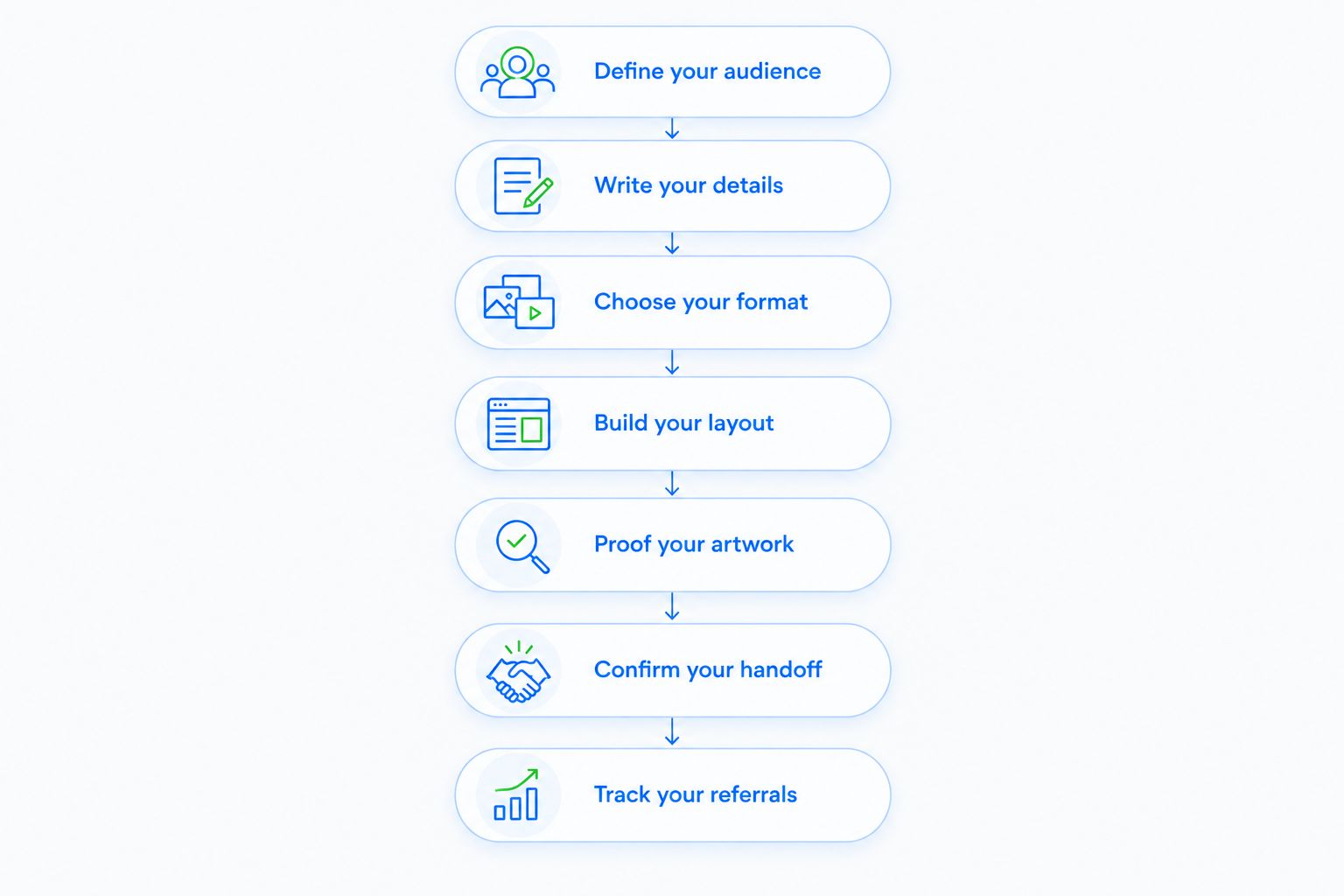
Follow this sequence for your 2026 card order: define your audience, write your details, choose your format, build your layout, proof your artwork, confirm your handoff and track your referrals. You can make the initial decisions with a plain document and a paper mock-up; printing comes after the content is settled.
Define your audience
Start by writing down the person you want to receive the card. A sole proprietor seeking bookkeeping support needs a different service cue from a business owner looking for corporate tax work. Choose the audience you actually serve, not every possible accounting client.
Best for referral-led practices: name the work you want referrals for. Use familiar language where technical terms add no value. A concise service line helps the recipient place your card in the right context after the conversation ends.
Keep event-specific messages separate from your permanent contact details. A seasonal handout can change without forcing you to redesign every staff card.
- Identify your primary client type.
- Choose the service you want the card to introduce.
- Use wording your clients recognise.
- Remove services your practice does not provide.
- Separate permanent information from campaign messages.
Write your details
Draft the card text in a document before opening a design template. Include your professional name, firm name, accurate designation where applicable, role and preferred contact details. Check spelling against your current professional records rather than copying an old card.
Give the reader a clear primary action. For an appointment-led practice, that might be contacting your office; for a practitioner who handles enquiries directly, it might be your business email. Do not print a personal number unless you intend to use it for client contact.
A physical address belongs on the card when clients need to visit. Otherwise, use that space for information that helps them reach you.
- Verify your name and professional designation.
- State your role without inflating your responsibilities.
- Choose one primary contact route.
- Check the phone number and email character by character.
- Include an office address only when it serves the recipient.
Choose your format
Make a paper mock-up first. A common North American business card size is 3.5 × 2 inches; confirm your printer’s selected dimensions before building the final file. The useful test is whether your details remain readable at the intended size, not whether the design looks impressive on a large screen.
Best for deadline-driven orders: Print Fast business card printing serves Toronto accountants who need a rush print option. Print Fast offers 1Hr, Same Day and 24Hr printing options, plus Local Delivery, Live Support and Custom Quotes. Confirm the arrangement for your specific order rather than treating a service label as a confirmed completion time.
Use the rush business cards Toronto guide when preparing an urgent request. Keep format choices separate from deadline decisions: changing a finish after approval means revisiting the order details.
- Confirm finished dimensions before designing.
- Decide whether the reverse side has a useful purpose.
- Request suitable stock and finish options.
- Ask how the chosen format affects the production schedule.
- Specify the date, time and destination where cards are needed.
Build your layout
Use a simple editor or existing template to establish a reading order: name, role, firm, contact details. Keep essential text away from the cut edge according to the printer’s template. Bleed is artwork extending beyond the trim line; the safe area keeps important content inside it.
For your 2026 design, use the reverse side only when it adds something useful. A short service statement or a labelled QR code earns its space. Repeating every front-side detail does not.
Best for broad client accessibility: keep a readable phone number or email on the card even when you add a QR code. The digital route should support the printed details, not replace them.
- Establish a clear reading order.
- Use contrast that keeps small text readable.
- Follow the printer’s bleed and safe-area instructions.
- Label the QR code with its purpose.
- Keep decorative elements out of contact information.
Proof your artwork
Print one sample sheet at actual size before approving production. Read it under ordinary office lighting and check whether the smallest essential text is comfortable to read. A screen preview is not a substitute for this test.
Ask two staff members to check the contact details independently. One can review names and credentials while the other checks the phone, email and destination page. This is a recommended approval routine, not a reason to skip your own final check.
If you use a QR code, test the printed sample on two phones. Confirm that the destination belongs to your practice, works without an unnecessary sign-in and offers the action promised by the label.
- Print the artwork at its intended size.
- Check both sides and their orientation.
- Verify every contact detail against a current record.
- Test the QR destination from the printed sample.
- Record who approved the final file.

Confirm your handoff
Build your order brief in a document before contacting a printer. Specify the people receiving cards, the quantity for each person, the approved files and the required handoff. Keep the production deadline separate from the meeting start time so there is room to check the finished order.
For a 2026 rush order, confirm when the cards must be in your hands, not just when printing must finish. Print Fast’s Local Delivery and Live Support are useful options to discuss, but your order still needs a confirmed schedule and destination.
Do not describe a job as ready while credentials or contact information remain unsettled. A final file means the content, layout and named approver are all resolved.
- List quantities by staff member.
- Supply the approved artwork version.
- State the required handoff date and time.
- Confirm collection or delivery arrangements.
- Ask how revisions affect the agreed schedule.
Track your referrals
Use a simple enquiry log before adding any tracking system. Ask new prospects how they heard about your practice and record whether a card helped them find you. That tells you more about usefulness than counting how many cards left the office.
For your 2026 review, distinguish referral introductions from event contacts. They answer different questions: one concerns who recommends you, while the other concerns where your team meets potential clients. Avoid treating every enquiry as a result of the printed card.
Keep tracking proportionate. A dedicated booking destination helps organise enquiries, but the printed phone number must remain useful for people who prefer to call.
- Ask how each new prospect found your practice.
- Record the referral source when provided.
- Separate event contacts from existing-client referrals.
- Note recurring confusion about your services.
- Revise unclear wording before the next order.
Compare card options for your accounting practice
Choose the simplest format that supports your actual client handoff. A printed card works without a device. A QR-assisted card connects paper to an online next step, but that destination needs ongoing attention.
The table compares design approaches, not confirmed stock or finish choices from a printer. Ask for the options suitable for your order before approving artwork. In particular, do not assume a QR code or a writable reverse side will work well on every surface.
| Option | Best for | Main advantage | Key limitation |
|---|---|---|---|
| Single-sided printed card | Accountants with a straightforward contact message | Keeps identity and contact details together | Leaves little room for service context |
| Double-sided printed card | Practices that need a short service statement | Separates contact details from supporting information | The reverse side can become an overcrowded service list |
| Printed card with QR code | Practices with a useful booking or contact destination | Connects an introduction to a specific online action | Requires a working destination and a printed-code test |
| Card with a writable area | Accountants who add a brief appointment note | Allows a personal reminder during a conversation | Requires a surface that accepts the intended pen |
A QR-assisted card is not automatically better than a plain card. If the destination only repeats the printed contact details, it adds another step without adding much help. A clear booking or enquiry purpose is the stronger reason to include it.
For a writable area, test a sample with the pen your team uses. Do not write client financial details on the card; keep notes to non-sensitive reminders.
Common mistakes accountants make
Treating credentials as decorative text
Your designation is professional information, not a styling device. Copying an outdated title or compressing it until it becomes hard to read undermines the card’s purpose. Verify the wording you are entitled to use and give it enough space.
Keep staff roles distinct. An administrator’s card should explain their actual role rather than borrow wording from a practitioner’s card.
Printing a complete service catalogue
A business card cannot explain every engagement your practice handles. A dense list of tax, bookkeeping, payroll and advisory services makes the contact details compete for attention. Select the service context that fits your audience and leave the detail for a conversation or separate handout.
Keep the card focused on recognition and contact. Service descriptions should clarify the introduction, not attempt to replace it.
Sending people to the wrong digital destination
A QR code labelled for appointments should not open an unrelated page. Nor should a business card direct strangers to an unrestricted document-upload route. Match the destination to the printed promise and keep sensitive-document handling separate from public enquiries.
Test the destination after website changes. The printed card remains in circulation even when your online pages move.
Ordering before the team details are settled
Staff changes, revised titles and office moves turn otherwise usable cards into correction jobs. Review your team list before approving a batch, especially when several people share a template. Changing the name alone does not prove that the phone number and email are correct.
For your final 2026 approval, review each staff version separately. Shared layouts still contain individual information.
FAQ
What should an accountant put on a business card?
An accountant should include their professional name, firm name, accurate designation where applicable, role and preferred contact details. Add a short service statement only when it helps the recipient understand the work you provide.
What’s the best business card format for accountants?
The best format is a readable printed card with a clear contact route. Use a second side when a service statement or useful QR destination needs space; otherwise, a focused single-sided layout is sufficient.
Should I put CPA on my accounting business card?
Use CPA only if you are entitled to use that designation. Check the applicable professional body’s requirements and confirm the wording before approving the artwork.
Is a QR code better than a phone number on an accountant’s card?
A QR code should complement a phone number or email rather than replace it. Use the code for a specific next step, such as a booking or contact page, and test it from a printed sample.
Can Print Fast print accountant business cards on a rush schedule?
Print Fast offers rush business card printing in Toronto, including 1Hr, Same Day and 24Hr options. Confirm the timing, artwork requirements and handoff arrangements for your specific order.
What size should accounting business cards be?
A common North American business card size is 3.5 × 2 inches. Confirm the selected finished dimensions and artwork template with your printer before designing.
Should an accounting business card include a client upload link?
Keep public business cards focused on contact or booking rather than sensitive-document submission. Explain the appropriate document-sharing process separately after establishing the client relationship.
One last thing
Give the finished card to someone who has not seen your design. Ask them to identify your role, the work you offer and the next action without coaching. If they hesitate, revise the hierarchy before ordering more.
The strongest test is not whether you like the design; it is whether someone else knows how to use it. Keep that test in your approval process whenever your practice changes its services or contact details.
Related guides
- Custom presentation folders for accountants
- NFC business cards for financial advisors
- Same-day business cards for last-minute meetings
Request a custom quote from Print Fast for your accountant business cards. Include your approved artwork, quantity by staff member and required handoff date and time.

