

Choose Print Fast if you need rush printing in Toronto/GTA with local support; choose Canva Print if you want to design marketing materials in Canva and order them through the same workflow. In 2026, the deciding difference is local production support versus design-to-order convenience—not which company has the better-looking templates.
- PrintFast vs Canva Print: choose Print Fast for Toronto rush printing and Canva Print for an integrated design-to-order workflow.
- Print Fast offers same-day printing, local delivery, live support and custom quotes; confirm your job’s turnaround before ordering.
- Canva Print suits small-business marketing materials created in Canva when the displayed delivery schedule meets your deadline.
- Both require careful artwork checks; an attractive screen preview does not replace a print-ready file.
For more options beyond this head-to-head, see the guide to Canva Print alternatives for small-business marketing materials.
Why this matters
A finished design and a finished print order solve different problems. You need both, but the bottleneck determines where to place the order.
If your flyer artwork is approved and your event is approaching, production timing matters most. If your deadline is flexible but you still need a layout, a design-led workflow removes a separate task. Choose the service that solves the unfinished part of your job.
For your 2026 marketing schedule, write down the date you need the materials in hand—not just the date you plan to order. Include the destination, the finished product and who approves the artwork. Those details turn a broad comparison into a practical purchasing decision.
At a glance
| Dimension | Print Fast | Canva Print |
|---|---|---|
| Best for | Toronto/GTA buyers needing rush production and local support | Buyers creating and ordering materials within Canva |
| Turnaround approach | 1Hr, Same Day and 24Hr services; confirm the specific job | Choose using the delivery estimate shown for the order |
| Design workflow | Production-led service for custom printing | Printing connected to Canva’s design editor |
| Local coordination | Toronto-based service, live support and local delivery | Online design and ordering workflow |
| Everyday marketing products | Business cards, flyers, banners, signs, stickers and more | Common printed marketing formats offered through Canva |
| Artwork responsibility | Check the file against the agreed print specifications | Check the design against the selected print format |
| Order handoff | Discuss specifications and timing through a custom quote | Move from a Canva design into its print-order workflow |
| Pricing model | Custom quotes for the specified job | Per-order calculation for the selected print configuration |
| Standout feature | Rush printing paired with local support | Design and print ordering in one workflow |
The table compares working methods, not interchangeable promises. A rush service label does not establish a completion time for every material, finish or quantity. Likewise, a design that exists in Canva does not establish that its print-order schedule fits your event.
Print Fast wins for Toronto rush-printing needs
Print Fast is best for Toronto businesses that need rush printing with local support. Its stated service options include 1-hour and 24-hour custom printing, alongside Same Day and Rush services.
That makes it the stronger starting point when you have approved artwork and an urgent local requirement. Business cards for a meeting, flyers for an event and replacement signs all put the deadline ahead of the design process.
The limitation is important: you still need confirmation for your exact job. Give the printer the product, quantity, artwork status and required arrival time. Ask whether the quoted turnaround refers to production completion or delivery to your destination.
Canva Print is the better fit when its displayed delivery schedule already works for you and you prefer to complete the order online. Do not treat that as a same-day Toronto service. Use the actual order schedule to make the decision, not the convenience of the editor.
Canva Print wins when the design is still unfinished
Canva Print’s clearest advantage is its connection to Canva’s design workflow. You can create a layout in the editor and move into print ordering without choosing a separate printer first.
For a small-business owner making a straightforward flyer or business card, that keeps the design and order decisions together. Templates provide a starting layout; you still supply the message, brand assets and final approval.
The trade-off is that an easy design process does not settle the physical specifications. You must still check dimensions, margins, image quality and the order’s delivery schedule. A template is a starting point, not a production guarantee.
Choose Canva Print when your main obstacle is building the artwork and the available print format suits the job. Choose a production-led service when the design is ready and your remaining questions concern materials, timing or local delivery.
Print Fast wins for local deadline coordination
Local coordination matters when several people must act on the same order. Your designer approves the file, your operations manager confirms the destination, and an event organizer needs the materials before setup begins.
Print Fast offers Live Support, Local Delivery and Custom Quotes. Those are useful when you need to discuss the job rather than select options and proceed directly to checkout.
The advantage is access to a local production conversation. The trade-off is that you need to communicate the requirements clearly; a quote request is not a substitute for a complete brief.
Canva Print suits buyers who prefer an online ordering process and can make their specifications fit the available selections. That is a genuine advantage for a straightforward order. For an urgent Toronto/GTA job, however, confirm the production and delivery plan before approving the order.
Both cover everyday small-business marketing needs
Business cards and flyers are not, by themselves, a reason to choose one service over the other. Both belong in this comparison for common printed marketing materials.
Start with how you will use the item. A networking card needs readable contact details. A handout needs a clear message and an obvious next action. A promotional sign needs a layout that remains understandable at its intended viewing distance.
The tie ends when the specification becomes more particular. Check the actual format, material, finish and quantity offered for your order. Do not assume that products with the same general name have matching construction or finishing options.
For a 2026 campaign, compare the same written specification on both sides. If you change the paper, dimensions or finishing between orders, you are comparing different products rather than different services.
Both depend on correct artwork and approval
Neither service removes your responsibility to approve the content. A misspelled phone number remains a misspelled phone number after printing, regardless of the ordering method.
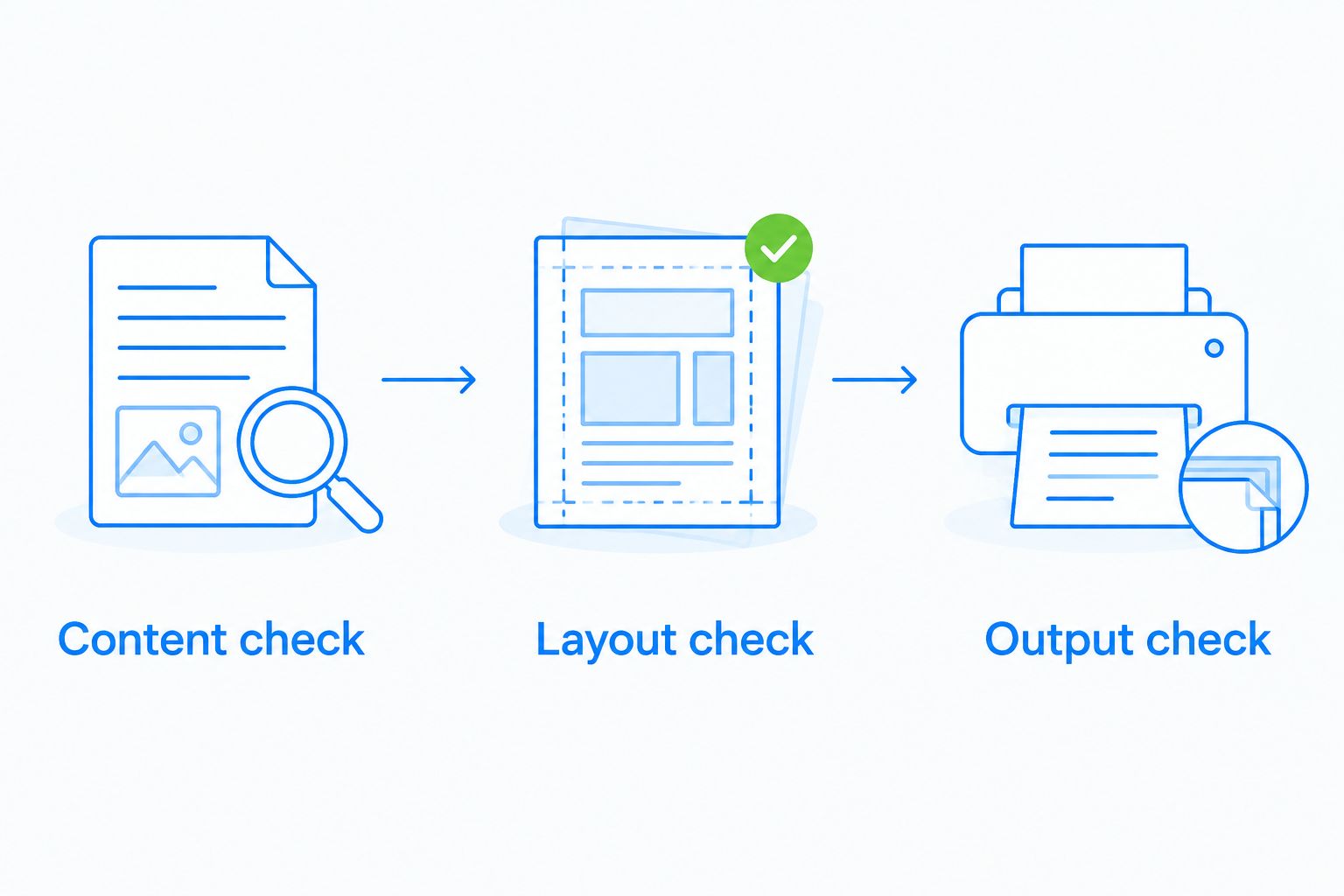
Before placing the order, make these 3 checks:
- Content check: Confirm names, contact details, dates, addresses and the final call to action.
- Layout check: Keep important content inside the safe area and extend edge-to-edge artwork according to the printer’s bleed requirements.
- Output check: Confirm the finished dimensions, readable text and image quality at the intended printed size.
Keep this distinction clear: a screen preview helps you inspect layout, but it does not show every physical property of the finished item. If colour or finishing is central to the job, ask what proofing options apply before you commit.
The honest verdict is a tie. Choose based on workflow and timing, then apply the same approval discipline to either service.
Canva Print wins for keeping design and ordering together
Canva Print is the better choice when you want the design file and print-order workflow in the same environment. That is especially useful when you are the person creating the artwork and approving the purchase.
It removes a separate printer-selection step for designs that match Canva’s available print products. You can evaluate the print configuration while working with the design rather than preparing a separate production brief first.
The limitation is choice: your order must fit the product options and fulfilment schedule presented in that workflow. If the job requires a different production arrangement, convenience alone is not a reason to keep it there.
Separate 2 decisions: where you create the artwork and where you print it. Designing in Canva does not require you to use Canva Print. If you use another printer, request its file specifications before exporting, rather than guessing the correct settings.
Print Fast wins for discussing a custom production brief
A custom quote is useful when your requirement cannot be expressed fully by a product name. “Flyers” does not explain the intended use, finished dimensions, paper preference, quantity or deadline.
Print Fast’s Custom Quotes provide a route for discussing those requirements. Its stated product range includes business cards, flyers, banners, signs, stickers, calendars and promotional items.
The benefit is a specification-led conversation. The trade-off is preparation: you need enough detail for the printer to assess the job and confirm the scope. Do not assume every requested material, finish or turnaround is included merely because custom quotes are offered.
For your 2026 order, send a short brief containing:
- The product and intended use.
- The finished dimensions and quantity.
- The material or finish you want assessed.
- Whether the artwork is final.
- The required arrival time and delivery destination.
Canva Print remains the better option when the available configuration already matches your brief and you want to proceed within the design workflow. Custom discussion is valuable when it resolves a real requirement, not simply because it adds another conversation.
Pricing models: custom scope versus configured ordering
Print Fast uses Custom Quotes to establish the scope of a job. Canva Print calculates an order from the selected product configuration. Compare the complete specification and fulfilment arrangement, not an isolated headline amount.
A configured ordering model helps you assess a defined selection before completing the purchase. A custom quote helps you document requirements that need discussion. Neither model, on its own, establishes which order offers better value.
For a fair comparison, match:
- Product, dimensions and quantity.
- Material, finish and printed sides.
- Artwork preparation responsibilities.
- Production timing and delivery destination.
- The approval process before production.
Keep rush production separate from design preparation. A fast print service cannot begin with an unapproved file, and a convenient editor cannot remove delivery time. Compare the job you need completed, not just the product you intend to buy.
Final verdict: choose the workflow that fits the deadline
Choose Print Fast if you manage an urgent Toronto/GTA order
Winner: Print Fast. Best for: local owners, marketing managers and event organizers with approved artwork and a deadline that needs direct coordination.
Start with the product and required arrival time. Ask which Rush, Same Day, 1Hr or 24Hr service applies to the exact specification, and confirm how local delivery fits the schedule. The strength is production support; the responsibility is supplying a clear brief and final approval.
Choose Canva Print if you create and order your own materials
Winner: Canva Print. Best for: small-business owners building marketing artwork in Canva whose deadline fits the displayed order schedule.
Choose the print format before finalizing the layout. Check the available configuration and delivery estimate before approving the design. The strength is an integrated workflow; the limitation is that the job must fit its offered products and fulfilment options.
For 2026, neither service is the universal winner. Rush local production and integrated design ordering are different advantages. Pick the one that solves your actual bottleneck.
One-glance scorecard
| Dimension | Winner |
|---|---|
| Urgent Toronto/GTA printing | Print Fast |
| Creating the design | Canva Print |
| Local deadline coordination | Print Fast |
| Everyday marketing products | Tie; compare the exact specification |
| Artwork approval responsibility | Tie; both require careful checks |
| Integrated design-to-order handoff | Canva Print |
| Custom production discussion | Print Fast |
| Pricing model | Tie; compare matched scope and fulfilment |
FAQ
Is Print Fast better than Canva Print for same-day printing in Toronto?
Print Fast is the better starting point for same-day printing in Toronto because it explicitly offers Same Day and Rush services. Confirm that the service applies to your product, quantity, artwork and required delivery time before ordering.
Is Canva Print better if I still need to design my business cards?
Canva Print is the better fit when you want to create the design in Canva and order through the same workflow. Check the print format and delivery estimate before finalizing the artwork.
Can I design something in Canva and use another printer?
Yes, you can export artwork from Canva for another printer. Request that printer’s dimensions, bleed and file requirements before exporting, and check any licensing conditions that apply to the design assets.
Which service should I choose for an urgent Toronto event?
Choose Print Fast when your urgent Toronto event requires a discussion about rush production and local delivery. Provide the required arrival time, destination, product specification and approved artwork so the schedule can be confirmed.
How should I compare the cost of Print Fast and Canva Print?
Compare a custom quote with the configured Canva Print order using the same product specification and fulfilment requirements. Match dimensions, quantity, material, finishing, production timing and delivery destination before deciding.
Does a finished Canva design mean my artwork is ready to print?
No, a finished Canva design still needs to meet the selected printer’s production requirements. Check content, finished dimensions, safe areas, bleed and image quality before approving the order.
One last thing
Your best printing decision can be a split workflow: create the artwork in Canva, then select the printer according to the physical job. The design platform and production service do not have to be the same choice.
Keep an approved master file and a written specification. For repeat orders, that gives you a consistent reference instead of relying on a remembered paper description or an old screen preview.
Related guides
- Same-day business card alternatives to Staples
- Trade show printing: banners versus backdrops
- Choosing sticker material for outdoor use
Request a custom quote from Print Fast for your business cards, flyers, banners or signs. Include your artwork status, quantity, destination and required arrival time.

