

A 6 × 9 in postcard fits Canada Post Neighbourhood Mail’s standard dimensional limits: the maximum standard size is 245 × 156 mm. For your 2026 campaign, check the finished card’s thickness, weight and construction as well—dimensions alone do not establish mailing eligibility.
- Canada Post’s standard neighbourhood mail postcard size limit is 245 × 156 mm.
- A 6 × 9 in postcard fits the standard dimensional limits; a 6 × 11 in postcard exceeds them.
- Choose your mailing service before designing: Neighbourhood Mail reaches selected delivery areas without individual recipient addresses.
- Confirm finished dimensions, stock and current Canada Post requirements before approving production.
Why this matters
Choose the mailing format before you approve the artwork. A postcard that fits your printer’s template does not automatically fit the postal category you intended to use. Trimming the card after approval can also remove text or disrupt the layout.
Start by confirming that you need area-based distribution rather than individually addressed mail. The guide to Canada Post Neighbourhood Mail vs Personalized Mail explains that service choice before you commit to a design.
For Toronto and GTA businesses planning a 2026 campaign, keep printing and postal preparation on the same brief. Your finished size, paper stock, delivery areas and campaign deadline belong together, not in separate conversations after production.
What size postcard can you send with Canada Post Neighbourhood Mail?
For a standard-format Neighbourhood Mail postcard, Canada Post’s dimensional limits are 100–245 mm long and 70–156 mm wide, with a maximum thickness of 5 mm. Treat the longer edge of a rectangular postcard as its length when comparing these dimensions.
The following examples show how familiar postcard formats compare. The classifications below concern dimensions only; they are not approval of a particular paper stock, finish or completed mailing.
| Finished postcard size | Metric dimensions | Fits standard dimensional limits? | Best for | Main limitation |
|---|---|---|---|---|
| 4 × 6 in | 101.6 × 152.4 mm | Yes | A short message with a single action | Less space for supporting details |
| 5 × 7 in | 127 × 177.8 mm | Yes | An image with concise explanatory copy | Detailed layouts still need careful editing |
| 6 × 9 in | 152.4 × 228.6 mm | Yes | A larger layout within standard dimensions | More space can encourage unnecessary copy |
| 6 × 11 in | 152.4 × 279.4 mm | No | A design that needs an oversized-format review | Exceeds the standard length limit |
A 6 × 9 in postcard is a practical starting point when you want more layout space without exceeding standard dimensions. It is not mandatory: a smaller card works when the message is short.
The dimensional reference is Canada Post’s published Neighbourhood Mail physical requirements. Before submitting a 2026 mailing, check the current Canada Post Customer Guide for the complete requirements covering your finished piece and its preparation.
4 × 6 in postcards: compact space for a short message
A 4 × 6 in postcard measures 101.6 × 152.4 mm, placing its dimensions within the standard limits. Choose this format when the reader needs a headline, a brief explanation and a clear next step—not a full service catalogue.
Best for: a focused announcement or simple local promotion. Its advantage is the discipline it imposes on the message. Its drawback is limited room for explanatory copy, photographs and contact details together.
Build the layout around what the recipient needs to understand immediately. If your first draft requires small text to fit, shorten the copy before reducing its size.
Do not assume the familiar format eliminates production checks. The actual trimmed card, rather than the dimensions displayed in your design file, is what enters the mail stream.
5 × 7 in postcards: room for an image and explanation
A 5 × 7 in postcard measures 127 × 177.8 mm and fits the standard dimensional limits. It gives you more room than a compact postcard without moving to the larger examples in this comparison.
Best for: a visual message that needs supporting context. You can separate the headline, image and response details instead of forcing them into the same small area. The trade-off is that a busy design can still overwhelm the available space.
Use the extra room to improve the reading order. A recipient should be able to distinguish the main message from the details without studying the card.
For an event notice, for example, give the event information a clear place in the layout. Do not let decorative elements compete with the location or the action you want readers to take.
6 × 9 in postcards: larger layout within standard dimensions
A 6 × 9 in postcard measures 152.4 × 228.6 mm. Both dimensions remain below the standard maximum of 156 mm wide and 245 mm long.
Best for: a local campaign that needs a headline, image and supporting details. The format gives you room to separate those elements. Its limitation is editorial: filling every available space can make the message harder to scan.
For your 2026 layout, assign each side a job. One side can introduce the main message; the other can explain the next step and provide the information needed to act.
A larger card does not establish better campaign results by itself. Choose it because your content needs the space, not because dimensions alone promise a stronger response.
6 × 11 in postcards: outside standard dimensions
A 6 × 11 in postcard measures 152.4 × 279.4 mm. Its length exceeds the standard maximum of 245 mm, even though its shorter edge remains within the standard width limit.
Best for: a layout that genuinely requires additional length and receives an oversized-format review. The extra space is the advantage. The need to confirm a different mailing classification is the drawback.
Do not describe this format as standard Neighbourhood Mail on your print brief. Ask for confirmation of the applicable oversized requirements, including the finished piece’s weight, thickness and construction.
If standard dimensions are a firm requirement, revise the layout before production. Reducing the trim size without checking the artwork risks cutting into content or leaving an awkward composition.
Why neighbourhood mail postcard size varies
There is no single postcard size that suits every message. Choose the format by working through these factors rather than selecting the largest card first:
- Message length: A brief announcement needs less room than a service explanation with supporting details.
- Image requirements: A photograph, map or illustration takes space away from written content.
- Reading order: Separate the headline, explanation and response details so readers can identify each element.
- Postal classification: Compare the finished dimensions with the category you intend to use before approving the file.
- Stock and construction: Thickness, folds and attachments require review alongside length and width.
- Production setup: Bleed and trim settings must match the printer’s requirements for the chosen finished size.
Choose the smallest format that keeps your message clear and meets the intended mailing requirements. This recommendation concerns layout suitability, not a promise about response or mailing expense.
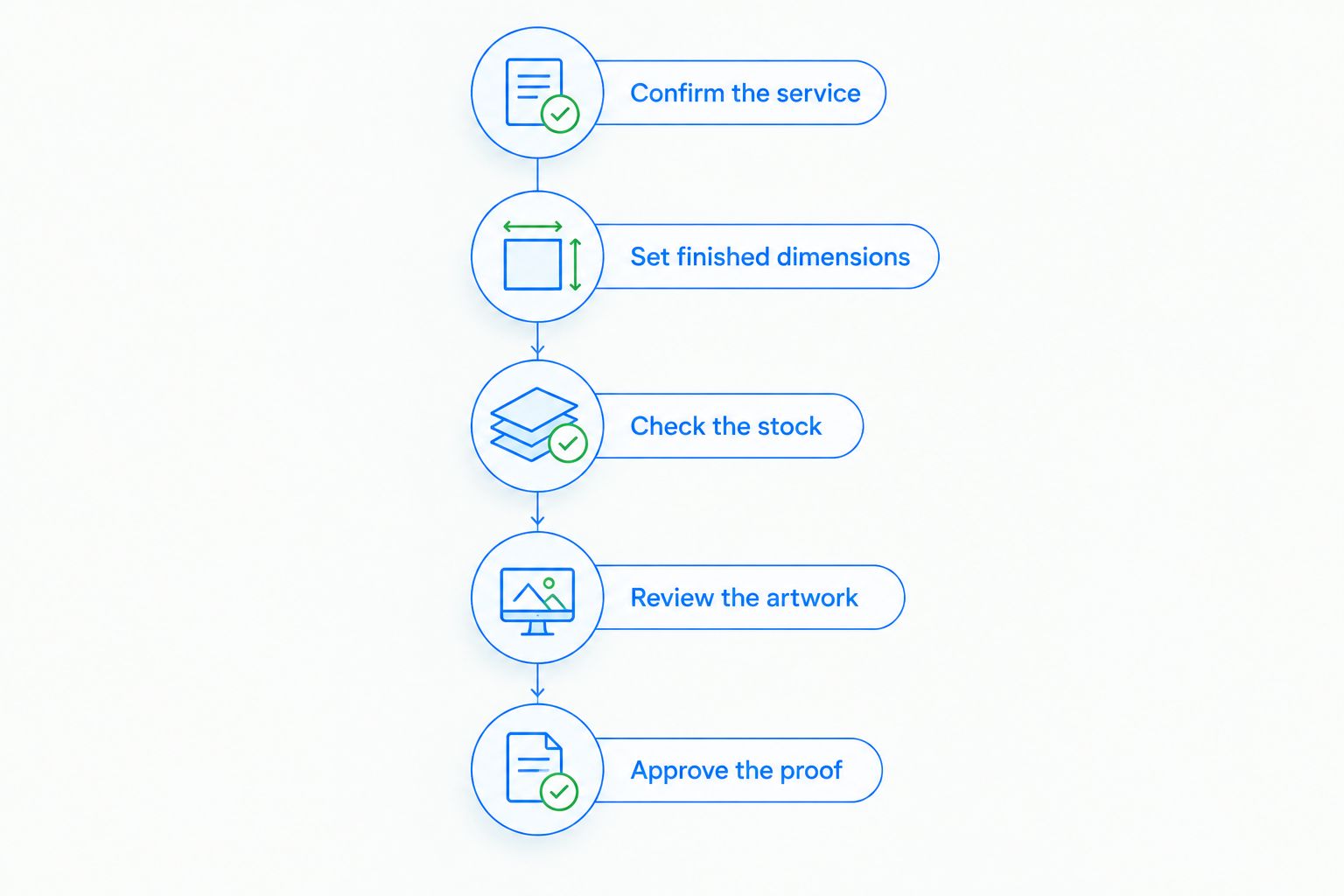
How do you check a postcard before printing?
Follow this sequence before approving your 2026 print run. It keeps the mailing decision ahead of production and gives everyone the same specification to review.
- Confirm the service. State that the piece is intended for Canada Post Neighbourhood Mail, rather than an individually addressed mailing.
- Set finished dimensions. Record the trimmed length and width in millimetres. Include the familiar inch size if your team uses it.
- Check the stock. Identify the proposed paper and finish, then review the completed piece’s thickness and weight against current requirements.
- Review the artwork. Check trim, bleed, text placement and any content close to an edge.
- Approve the proof. Review the actual-size layout and confirm the mailing specification before releasing production.
The sequence matters. An artwork approval should not silently become an approval of postal eligibility, and a print deadline should not be treated as a delivery date.
Keep the approved specification with the final artwork. If someone changes the trim size or stock later, review the mailing requirements again rather than relying on the earlier approval.
For file preparation, the Canva-to-print-ready workflow covers the design handoff. Follow the printer’s supplied bleed and export requirements rather than adding an assumed margin.
Does bleed count toward the postcard’s mailing size?
A 6 × 9 in finished postcard remains 152.4 × 228.6 mm after trimming; bleed is artwork outside that finished edge. Compare Canada Post’s dimensional limits with the completed physical piece, not the larger exported artwork area.
Bleed lets a background image or colour extend beyond the intended cut line. Keep important text inside the printer’s specified safe area, since the trim edge is not a suitable place for essential details.
Ask for the correct template before designing. Do not assume a bleed measurement from another printer or another product applies to this postcard.
Can I use a regular postcard template for Neighbourhood Mail?
A 4 × 6 in template fits the standard dimensional limits, but the template alone does not establish Neighbourhood Mail eligibility. Confirm the finished size, proposed stock and current preparation requirements before printing.
A template designed for individually addressed postcards can also include elements your area-based mailing does not need. Check the intended mailing service before reserving space for an address or postage treatment.
Keep the brief explicit. Writing only “postcard printing” leaves the mailing purpose unclear to the person checking the file.
What should you include in a print quote request?
Give the printer the finished dimensions, quantity, stock preference, artwork status and required print-completion date. State that the cards are intended for Canada Post Neighbourhood Mail and ask which mailing-related checks or preparation services are included.
Print Fast is best for Toronto businesses seeking local support and rush printing for a direct-mail campaign. Its stated offer includes fast-turnaround printing, live support and custom quotes; a postal delivery commitment is a separate question.
Print Fast direct-mail printing enquiries should distinguish the production deadline from the desired mailing date. Confirm responsibility for postal preparation and deposit rather than assuming those tasks form part of a print order.
The practical advantage of Print Fast’s rush printing is access to a fast production discussion when timing matters. The limitation is equally important: a print turnaround label does not establish Canada Post acceptance or delivery timing for your campaign.
FAQ
What is the maximum standard neighbourhood mail postcard size?
The maximum standard Neighbourhood Mail dimensions are 245 × 156 mm, with a maximum thickness of 5 mm. Check the finished piece against Canada Post’s current weight, construction and preparation requirements as well.
Can I send a 6 by 9 postcard through Canada Post Neighbourhood Mail?
A 6 × 9 in postcard measures 152.4 × 228.6 mm and fits the standard dimensional limits. The finished stock and mailing preparation still need to meet the applicable requirements.
Is a 6 by 11 postcard standard Neighbourhood Mail size?
A 6 × 11 in postcard is not within standard dimensions because its 279.4 mm length exceeds the 245 mm maximum. Review the oversized requirements before ordering that format.
What is the minimum size for a standard Neighbourhood Mail piece?
The minimum standard dimensions are 100 mm long and 70 mm wide. Meeting those dimensions does not replace the other physical and preparation requirements.
Do I measure my postcard before or after trimming?
Measure the finished postcard after trimming. Artwork bleed extends beyond the finished edge and is not part of the mailed card’s final dimensions.
Do Neighbourhood Mail postcards need individual addresses?
Neighbourhood Mail postcards do not need individual recipient addresses because distribution is based on selected delivery areas. Confirm that this area-based approach suits your campaign before choosing the service.
Does same-day printing mean my postcards arrive the same day?
Same-day printing does not mean same-day postal delivery. Confirm print completion, mailing preparation, deposit and delivery timing as separate parts of the campaign schedule.
One last thing
Print an actual-size paper proof before approving the full run. Cut it to the intended finished dimensions, read both sides and check that the response details remain easy to find.
A screen preview does not show you the physical card at its real size unless you deliberately set it up that way. For your 2026 campaign, make that final physical check part of approval—not a discovery after the cards arrive.
Related guides
- How Canada Post Neighbourhood Mail works for small businesses
- Postcards for direct mail marketing campaigns
- Postcards for real estate farming campaigns
Request a quote from Print Fast for your Neighbourhood Mail postcards. Include your finished size, quantity, artwork and required print-completion date.

